1. GSManager
    1. Funktionen
    2. Unterstützte Spiele
    3. Neuigkeiten
    4. Statistiken
    5. Serverliste
  2. Lexikon
  3. Filebase
  4. Entwicklung
  5. Forum
    1. Dashboard
    2. Unerledigte Themen
  6. Mitglieder
    1. Letzte Aktivitäten
    2. Benutzer online
    3. Team
    4. Mitgliedersuche
  • Anmelden
  • Registrieren
  • Suche
Dieses Thema
  • Alles
  • Dieses Thema
  • Dieses Forum
  • Artikel
  • Seiten
  • Dateien
  • Forum
  • Lexikon
  • Erweiterte Suche
  1. GSManager
  2. Forum
  3. Unterstützung
  4. Installation

Linux installation Error

  • thamidu
  • 12. März 2017 um 21:49
Das Projekt GSManager (vormals ManuAdminMod) wurde am 01.01.2020 eingestellt - diese Internetpräsenz bleibt verfügbar, die Software wird aber nicht länger gepflegt. Vielen Dank für eure Unterstützung in den mehr als zehn vergangenen Jahren!
1. offizieller Beitrag
  • thamidu
    Anfänger
    Punkte
    25
    Beiträge
    4
    • 12. März 2017 um 21:49
    • #1

    Hey guys,

    Recently I tried to run GSManager through BrightGame Panel in my debian VPS. So the other admins can control GSManager without accessing SSH. But unfortunately, the BGPanel runs the executable in a screen.
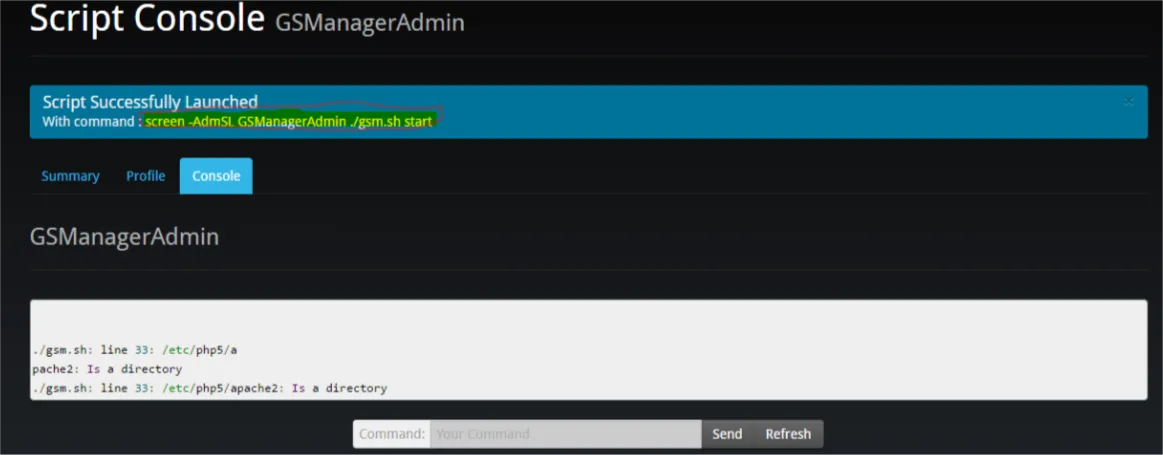
    So I edited gsm.sh like this, to avoid to open another screen which makes the first screen CRASH.
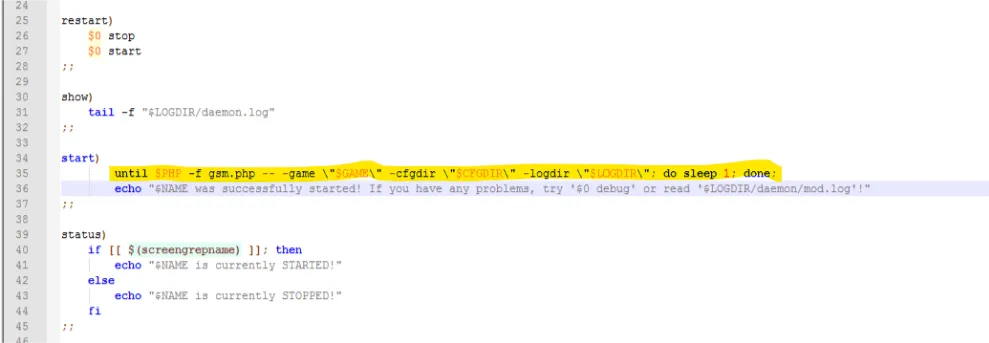
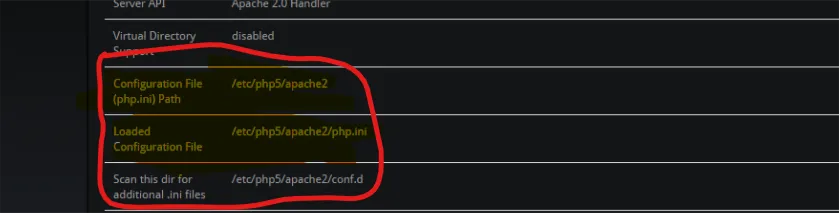
    But it gets an error with the php folder which is etc/php5/apache2. It gives an error called"./gsm.sh: line 33: /etc/php5/apache2: Is a directory".

    So how can I get rid of this? (I tried to run without using " ./ ". Then it says no such file or directory. And I'm pretty sure i did cd to the correct folder. I checked php folder path hundred times too)
    Bilder

    • Capture.PNG
      • 5,57 kB
      • 648 × 142
  • Yenz
    Entwickler
    Reaktionen
    90
    Punkte
    10.180
    Trophäen
    5
    Beiträge
    1.988
    Einträge
    9
    • 12. März 2017 um 23:38
    • #2

    Most likely some of your environment variables are wrong.

    So one thing first: your screenshot of gsm.sh doesn't show anything on line 33 to which your error points. That makes it even harder to help you.

    But your main error: $PHP ist set to /etc/php5/apache2 (instead of pointing to your php executable).

    You can set this var in the gsm.cfg file. For a linux machine it is likely to be "/usr/bin/php".

  • thamidu
    Anfänger
    Punkte
    25
    Beiträge
    4
    • 13. März 2017 um 14:21
    • #3

    Thank you for the Reply,

    Actually the problem was the php path that i have set for the $PHP and now its fixed. Thank you.

    Now a new problem came up. Now its asking permission for "logfiles"/ folder. Then I gave sudo chmod -R 0766 /root/coda/gsm/logfiles to set permissions. But nothing change happen, the error is still the same! Any help?

    The error code is

    Code
    Error: The folder "logfiles"/ is not writeable. Please change the permissions of 
    this folder

    I did ls -l and it has "drwxrw-rw-" permission

    UPDATE:

    I edited the line 35 of gsm.sh to

    until $PHP -f gsm.php -- -game "$GAME" -cfgdir "$CFGDIR" -logdir "$LOGDIR"; do sleep 1; done;

    that was like this before.

    until $PHP -f gsm.php -- -game \"$GAME\" -cfgdir \"$CFGDIR\" -logdir \"$LOGDIR\"; do sleep 1; done;

    Then I ran the executable and the error "The folder 'logfiles'/ is not writeable" didn't show up. But now theres another problem. Now it is a syntax error in /daemon/core/utils.php.

    Here is the log in logfiles/deamon.log

    Code
    [13.03.17 14:48:30] Notice: Parsing Error in root/cod43/gsmanager/daemon/core/utils.php:216 => syntax error, unexpected 'class' (T_CLASS), expecting identifier (T_STRING) or variable (T_VARIABLE) or '{' or '$'
    
    [13.03.17 14:48:31] Notice: Parsing Error in root/cod43/gsmanager/daemon/core/utils.php:216 => syntax error, unexpected 'class' (T_CLASS), expecting identifier (T_STRING) or variable (T_VARIABLE) or '{' or '$'

    3 Mal editiert, zuletzt von thamidu (13. März 2017 um 15:16)

  • Dieses Thema enthält 7 weitere Beiträge, die nur für registrierte Benutzer sichtbar sind.
  1. Mitarbeiter
  2. Datenschutzerklärung
  3. Nutzungsbedingungen
  4. Impressum
  5. Kontakt
Community-Software: WoltLab Suite™