



Yea, that helps a lot.
Can you replace the daemon/engines/quake3/cod8/data/weapons.json with your one and see if it worksAlso a list of team names would be great

some errors found.
i sent log files in private for you.
Yea, that helps a lot.
Can you replace the daemon/engines/quake3/cod8/data/weapons.json with your one and see if it worksAlso a list of team names would be great
some errors found.
i sent log files in private for you.
Hey,
sry that you had to wait so long.
I implemented a first version for mw3.
Maps and Gametypes should work.Weapon Names are a bit more complicated because I need their internal names. To get this internal names I modified the weapon class to log every unknown weapon to logdir/weapons.json. It would be cool if you could upload these files after some days so I can start to implement them
Thanks.
Can it help you ?
{
    "extensions": {
        "reflex": "reflex",
        "acog": "acog",
        "grip": "grip",
        "akimbo": "akimbo",
        "thermal": "thermal",
        "shotgun": "shotgun",
        "heartbeat": "heartbeat",
        "fmj": "fmj",
        "xmags": "xmags",
        "rof": "rof",
        "eotech": "eotech",
        "tactical": "tactical",
        "vzscope": "vzscope",
        "gl": "gl",
        "gp25": "gp25",
        "m320": "m320",
        "silencer": "silencer",
        "silencer02": "silencer02",
        "silencer03": "silencer03",
        "hamrhybrid": "hamrhybrid",
        "hybrid": "hybrid",
        "zoomscope": "zoomscope"
    },
    "special": {
        "MOD_EXPLOSIVE": "Explosion",
        "MOD_FALLING": "Fall",
        "MOD_TRIGGER_HURT": "World",
        "MOD_SUICIDE": "Suicide",
        "MOD_RIFLE_BULLET": "Bullet",
        "none": "none"
    },
    "weapons": {
        "Miscellaneous": {
            "MOD_MELEE": "Knife"
        },
        "Grenades": {
            "frag_grenade": "FRAG",
            "semtex_mp": "SEMTEX",
            "throwingknife": "TROWING KNIFE",
            "flash_grenade_mp": "FLASH GRENADE",
            "concussion_grenade_mp": "CONCUSSION GRENADE",
            "emp_grenade_mp": "EMP GRENADE",
            "smoke_grenade_mp": "SMOKE GRENADE"
        },
        "HandGuns": {
            "iw5_usp45": "USP .45",
            "iw5_p99": "P99",
            "iw5_mp412": "MP412",
            "iw5_44magnum": ".44 MAGNUM",
            "iw5_fnfiveseven": "FIVE SEVEN",
            "iw5_deserteagle": "DESERT EAGLE"
        },
        "Explosives": {
            "claymore": "CLAYMORE",
            "c4": "C4",
            "scrambler": "SCRAMBLER",
            "trophy": "TROPHY SYSTEM",
            "specialty_tacticalinsertion": "TACTICAL INSERTION",
            "portable_radar": "PORTABLE RADAR",
            "nuke": "Nuke"
        },
        "weapons": {
            "iw5_m4": "M4A1",
            "iw5_m16": "M16A4",
            "iw5_scar": "SCAR-L",
            "iw5_cm901": "CM901",
            "iw5_type95": "TYPE 95",
            "iw5_g36c": "G36C",
            "iw5_acr": "ACR 6.8",
            "iw5_mk14": "MK 14"
            "iw5_ak47": "AK-47",
            "iw5_fad": "FAD",
            "iw5_mp5": "MP5",
            "iw5_ump45": "UMP45",
            "iw5_pp90m1": "PP90M1",
            "iw5_p90": "P90",
            "iw5_m9": "PM-9",
            "iw5_mp7": "MP7",
            "iw5_sa80": "L86 LSW",
            "iw5_mg36": "MG36",
            "iw5_pecheneg": "PKP PECHENEG",
            "iw5_mk46": "MK646",
            "iw5_m60": "M60E4",
            "iw5_barrett": "BARRETT .50CAL",
            "iw5_l96a1": "L118A",
            "iw5_dragunov": "AS50",
            "iw5_as50": "AS50",
            "iw5_rsass": "RSASS",
            "iw5_msr": "MSR",
            "riotshield": "Riot Shield",
            "iw5_fmg9": "FMG9",
            "iw5_mp9": "MP9",
            "iw5_skorpion": "SKORPION",
            "iw5_g18": "G18",
            "iw5_smaw": "SMAW",
            "javelin": "JAVELIN",
            "stinger": "STINGER",
            "xm25": "XM25",
            "m320": "M320 GLM",
            "rpg": "RPG-7"
        }
    }
}I can create a test version for cod8, but I need a list of maps and gametypes with their internal name.
"mp_crash" => "Crash" for example.
{
    "mp_alpha": "Lockdown",
    "mp_bootleg": "Bootleg",
    "mp_bravo": "Mission",
    "mp_carbon": "Carbon",
    "mp_dome": "Dome",
    "mp_exchange": "Downturn",
    "mp_hardhat": "Hardhat",
    "mp_interchange": "Interchange",
    "mp_lambeth": "Fallen",
    "mp_mogadishu": "Bakaara",
    "mp_paris": "Resistance",
    "mp_plaza2": "Arkaden",
    "mp_radar": "Outpost",
    "mp_seatown": "Seatown",
    "mp_underground": "Underground",
    "mp_village": "Village",
    "mp_morningwood": "Blackbox",
    "mp_park": "Liberation",
    "mp_qadeem": "Oasis",
    "mp_overwatch": "Overwatch",
    "mp_italy": "Piazza",
    "mp_meteora": "Sanctuary",
    "mp_cement": "foundation",
    "mp_aground_ss": "Aground",
    "mp_hillside_ss": "Getaway",
    "mp_restrepo_ss": "Lookout",
    "mp_courtyard_ss": "Erosion",
    "mp_terminal_cls ": "Terminal",
    "mp_roughneck": "Offshore",
    "mp_burn_ss": "Uturn",
    "mp_crosswalk_ss": "Intersection",
    "mp_nola": "Parish",
    "mp_moab": "Gulch",
    "mp_six_ss": "Vortex",
    "mp_boardwalk": "Boardwalk",
    "mp_shipbreaker": "Decommission"
}{
"war": "Team Deathmatch",
"dom": "Domination",
"ctf": "Capture the Flag",
"grnd": "Drop Zone",
"dm": "Free for All",
"gun": "Gun Game",
"koth": "Headquarters",
"infect": "Infected",
"jugg": "Juggernaut",
"conf": "Kill Confirmed",
"oic": "One In The Chamber",
"sab": "Sabotage",
"sd": "Search & Destroy",
"tdef": "Team Defender",
"tjugg": "Team Juggernaut"
}in mw3(cod8) gametypes load from a folder by this name : admin
and gametypes can changed and personalization .
name of gametypes in admin folder is : for exp = tdm.dsr Or jugtdm.dsr Or .....
you change cod8 in gsm that load any .dsr files that are in admin folder .
Do you mean this:
yep ...Thanks.
@Mirko911 see my other Thread .
I help you for compelet GSM project for mw3 (cod8) ..
Have you yahoo or Telegram for easy chating ?
Hi Guys .
In GSM forum when in my thread's everybody replay Or any notifications shown for me no Email sent to me until i award of this notifications .
Add this ability in GSM Forum ,please . 
we can implement cod8 if you want, but we need a listing of all maps, gametypes, weapons
where are you ?
I create new maps.json & gametypes.json for cod8 .
you changed weapons list ?
we can implement cod8 if you want, but we need a listing of all maps, gametypes, weapons
For weapon list : http://www.themodernwarfare3.com/mw3/weapons-list/
This help you?
or you need to weapon like this : iw5_m4 => http://www.nextgenupdate.com/forums/modern-…lasses-rte.html
you Okay this & i edited maps and game types for you 
in cod2 - cod5 there are only knockback, speed and gravity.
We implemented all of them:PHP: commands.php$this->commands->registerSubCommand("set", "knockback", "~knockback (\d+)?~i", "setKnockback", $this); $this->commands->registerSubCommand("set", "gravity", "~gravity (\d+)?~i", "setGravity", $this); $this->commands->registerSubCommand("set", "speed", "~speed (\d+)?~i", "setSpeed", $this);So maybe you mean !set gravity ?
No , My server is COD6{MW2}
He uses cod 6 ...
Yes ..
& new version of GSManager support COD8{mw3} ??
your team and weapon only get shown once u made a kill. otherwise it is impossible for GSM to determine which weapon or what team u have/are on.
yep..
I think you forgot to add !set jump in GSManager => how do this ??
Thanks @Mirko911 Debugged ...
New Bug :
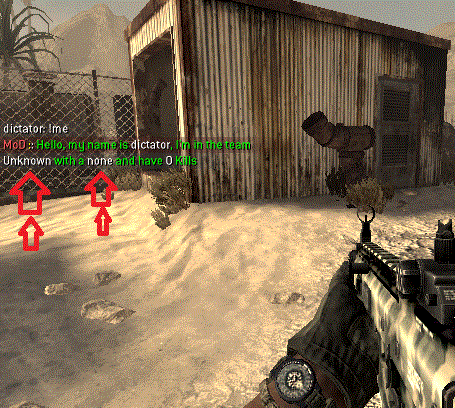
& I think you forgot to add !set jump in GSManager => how do this ??
when i type command (( !me )) in my server adminmod crashed ...
Fatal error: Class '\GSM\Daemon\Engines\Quake3\Games\Cod6\Weapons' not found in /root/game/rpz-1/adminmod/daemon/libraries/weapons/weapons.php on line 51
[01.04.16 23:09:42] Error: Error in root/game/rpz-1/adminmod/daemon/libraries/weapons/weapons.php:51 => Class '\GSM\Daemon\Engines\Quake3\Games\Cod6\Weapons' not found
I test it again & understand : ALL FUN MESSAGE NOT WORK AND FUN MESSAGES ARE CAUSE OF CRASHED GSMANAGER .
in json the backslash \ character is used to escape special characters. So if you want to actually use it type it twice:
"logfile": "C:\\Users\\Administrator\\Desktop\\game\\PM-1\\m2demo\\games_mp.log"
Thank You . worked
but what's commands ?? in game server !admins ? !fastrestart ?
1) Change line "logfile" in basics.json and put your logfile path in.
2) Please post one complete log.
1) changed :
"quake3": {
        "antistartupbug": true,
        "fastrcon": false,
        "fixguidrelax": true,
        "logfile": "C:\Users\Administrator\Desktop\game\PM-1\m2demo\games_mp.log"
    },
but give Error :
[30.03.16 18:19:34] Info: =========================
[30.03.16 18:19:34] Info: GSManager (Version 1.1.0)
[30.03.16 18:19:34] Info: =========================
[30.03.16 18:19:34] Error: Error in file "config/\basics.json": Syntax error
[30.03.16 18:19:34] Info: =========================
[30.03.16 18:19:34] Info: GSManager (Version 1.1.0)
[30.03.16 18:19:34] Info: =========================
[30.03.16 18:19:34] Error: Error in file "config/\basics.json": Syntax error
[30.03.16 18:19:34] Info: =========================
[30.03.16 18:19:34] Info: GSManager (Version 1.1.0)
[30.03.16 18:19:34] Info: =========================
[30.03.16 18:19:34] Error: Error in file "config/\basics.json": Syntax error
[30.03.16 18:19:34] Info: =========================
[30.03.16 18:19:34] Info: GSManager (Version 1.1.0)
[30.03.16 18:19:34] Info: =========================
[30.03.16 18:19:34] Error: Error in file "config/\basics.json": Syntax error1) How can i change my games_mp.log direction ? (this is not in main folder)
2) I change my basics.json file (punkbuste = false) :
"punishment": {
        "actions": [
            [0, "warn", {}],
            [25, "kill", {}],
            [50, "kick", {}],
            [75, "tempban", {"time": 60}],
            [100, "ban", {}]
        ],
        "announce": true,
        "deftempbandur": "5",
        "forcereason": false,
        "immunitynote" : false,
        "maxtempbandur": "1440",
        "pointsforwarn": 10,
        "punkbuster": false,
        "resetscoreonjoin": true,
        "saveperm": true
    },
BUT give me this error too :
[30.03.16 05:44:24] Warning: Punishment kill does not exist. Skipping.
[30.03.16 05:44:25] Notice: Punkbuster: PB is disabled on this server (sv_punkbuster = 0), please enable it before using this plugin
and GSManager starting again & again & ....
Help ..
apt-get install php php5-cli php5-mysql php5-sqlite php5-curl
when i paste this command in ubunto give me an error :
root@localhost# apt-get install php php5-cli php5-mysql php5-sqlite php5-curl
Reading package lists... Done
Building dependency tree
Reading state information... Done
E: Unable to locate package php
how fix this error ? and install PHP pacjage in my ubuntu ?
in manu admin mod :(startscript)
#!/bin/sh


# STARTSCRIPT by Hool and manu
# Much thanks to him :)
#
# If you have any problems, visit manuadminmod.de
# or contact manuel.strider@web.de
#
#============================
#
#=========
# CONFIG
#=========
#
# Name of process
# Unique for each mod installation
#=================================
NAME=ManuAdminMod_1
#Default: NAME=ManuAdminMod_1
#
# Basedir to adminmod installation:
#==================================
DIR=/home/gameserver/cod4_1/adminmod
#Example: DIR=/var/games/cod4/adminmod
#
# Path to config directory
#=========================
CFGDIR=config
#Default: CFGDIR=config
#
# Path to log directory
#======================
LOGDIR=log
#Default: LOGDIR=log
#
# Additional parameters for the mod (e.g. -force)
#================================================
PARAMS=""
#Default: PARAMS=""
#
# Path to php-binary
# Normally only 'php'
#===================
PHP=php
#Example: PHP=/usr/local/bin/php
#
# Parameters for PHP (only for versed user)
#==========================================
PHPPARAMS="-f"
#Default: PARAMS="-f"
#
#==================================
#  DO NOT EDIT STH BELOW THIS LINE
#==================================


# -------------------------------------------------------------------
case "$1" in
    start)
        if [[ `screen -ls |grep $NAME` ]]
        then
            echo "Error: $NAME is already running, use '$0 stop' to stop it"
        else
            cd $DIR
            screen -dmS $NAME $PHP $PHPPARAMS daemon.php -- -configdir "$CFGDIR" -logdir "$LOGDIR" $PARAMS
            echo "$NAME was started. If you have problems try '$0 debug'"
        fi
    ;;
    stop)
        if [[ `screen -ls |grep $NAME` ]]
        then
            kill `screen -ls |grep $NAME |awk -F . '{print $1}'|awk '{print $1}'`
            echo "$NAME was stopped"
        else
            echo "Error: $NAME isn't currently running"
        fi
    ;;
    status)
        if [[ `screen -ls |grep $NAME` ]]
        then
            echo "$NAME is currently running"
        else
            echo "$NAME is NOT running"
        fi
    ;;
    debug)
        if [[ `screen -ls |grep $NAME` ]]
        then
            echo "Error: $NAME is running, use '$0 stop' to stop it"
        else
            cd $DIR
            $PHP $PHPPARAMS daemon.php -- -configdir "$CFGDIR" -logdir "$LOGDIR" $PARAMS
        fi
    ;;
    show)
        tail -f "$LOGDIR/mod.log"
    ;;
    *)
        echo "Usage: $0 {start|stop|status|debug|show}"
        exit 1
    ;;
esac


exit 0line 44. we must set php directory ??? no need to edit php= ??
&&&&
apt-get install php5 php5-cli php5-mysql php5-sqlite php5-curl
I install them but when i want to start Manu Admin Mod give me this error :
# ./startscript show
      0:00 [28.03.16 14:53:04] Notice: Updated teamnames (opforce_composite vs. us_army)
      0:00 [28.03.16 14:53:05] Notice: Sets Dvar _manuadminmod to '0.11.4_beta'
      0:00 [28.03.16 14:53:05] Notice: == Loading plugins and commands ==
      0:00 [28.03.16 14:53:05] Notice:  - Loading mapvote.php
      0:00 [28.03.16 14:53:05] Notice:  - Loading funmessages.php
      0:00 [28.03.16 14:53:05] Notice:  - Loading welcomemessages.php
      0:00 [28.03.16 14:53:05] Notice:  - Loading warns.php
      0:00 [28.03.16 14:53:05] Notice:  - Loading tcp_query.php
      0:00 [28.03.16 14:53:05] Notice:  - Loading statistics.php
0:00 [28.03.16 14:53:05] !! Error: Statistics: SQLite extension for PHP is not installed! Please install the SQLite (v2.X) extension to use this featureThank for Replay .
This ERROR in my ubuntu 14 :
root@localhost# apt-get install php php5-cli php5-mysql php5-sqlite php5-curl
Reading package lists... Done
Building dependency tree
Reading state information... Done
E: Unable to locate package php
in manu admin mod :(startscript)
#!/bin/sh


# STARTSCRIPT by Hool and manu
# Much thanks to him :)
#
# If you have any problems, visit manuadminmod.de
# or contact manuel.strider@web.de
#
#============================
#
#=========
# CONFIG
#=========
#
# Name of process
# Unique for each mod installation
#=================================
NAME=ManuAdminMod_1
#Default: NAME=ManuAdminMod_1
#
# Basedir to adminmod installation:
#==================================
DIR=/root/game/manu
#Example: DIR=/var/games/cod4/adminmod
#
# Path to config directory
#=========================
CFGDIR=config
#Default: CFGDIR=config
#
# Path to log directory
#======================
LOGDIR=log
#Default: LOGDIR=log
#
# Additional parameters for the mod (e.g. -force)
#================================================
PARAMS=""
#Default: PARAMS=""
#
# Path to php-binary
# Normally only 'php'
#===================
PHP=
#Example: PHP=/usr/local/bin/php
#
# Parameters for PHP (only for versed user)
#==========================================
PHPPARAMS="-f"
#Default: PARAMS="-f"
#
#==================================
#  DO NOT EDIT STH BELOW THIS LINE
#==================================


# -------------------------------------------------------------------
case "$1" in
    start)
        if [[ `screen -ls |grep $NAME` ]]
        then
            echo "Error: $NAME is already running, use '$0 stop' to stop it"
        else
            cd $DIR
            screen -dmS $NAME $PHP $PHPPARAMS daemon.php -- -configdir "$CFGDIR" -logdir "$LOGDIR" $PARAMS
            echo "$NAME was started. If you have problems try '$0 debug'"
        fi
    ;;
    stop)
        if [[ `screen -ls |grep $NAME` ]]
        then
            kill `screen -ls |grep $NAME |awk -F . '{print $1}'|awk '{print $1}'`
            echo "$NAME was stopped"
        else
            echo "Error: $NAME isn't currently running"
        fi
    ;;
    status)
        if [[ `screen -ls |grep $NAME` ]]
        then
            echo "$NAME is currently running"
        else
            echo "$NAME is NOT running"
        fi
    ;;
    debug)
        if [[ `screen -ls |grep $NAME` ]]
        then
            echo "Error: $NAME is running, use '$0 stop' to stop it"
        else
            cd $DIR
            $PHP $PHPPARAMS daemon.php -- -configdir "$CFGDIR" -logdir "$LOGDIR" $PARAMS
        fi
    ;;
    show)
        tail -f "$LOGDIR/mod.log"
    ;;
    *)
        echo "Usage: $0 {start|stop|status|debug|show}"
        exit 1
    ;;
esac


exit 0line 44. we must set php directory ???
Hi Guy's .
I need to PHP files for linux server .
I download any version of php but not working in my linux server .
send me a link of PHP files that working in linux Manu Admin Mod version correctly .
Thank's.